When renting an LED wall, pixel pitch is one of the most important specifications to understand. Choosing the right pixel pitch ensures your content looks sharp, professional, and easy to view — without overspending on resolution you don’t actually need.
What Is Pixel Pitch?
Pixel pitch refers to the distance, measured in millimeters, between the center of one LED pixel and the center of the next. It is written as “P” followed by a number. For example, P2.6 means pixels are spaced 2.6mm apart, while P3.9 means 3.9mm spacing.
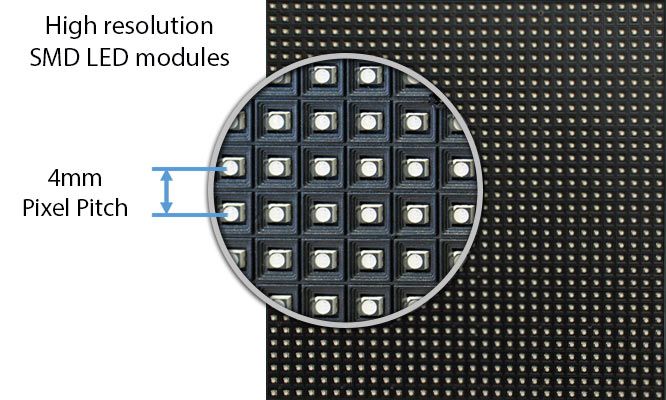
A smaller pixel pitch results in higher pixel density and a sharper image at close viewing distances. A larger pixel pitch works well when the audience is farther away.
Pixel Pitch and Viewing Distance
A widely used guideline is that the minimum comfortable viewing distance (in meters) roughly matches the pixel pitch number. For example, a P2.6 display looks best from about 2.5–3 meters away, while a P3.9 display is ideal from 4 meters and beyond.
This is not a strict rule. Content type, brightness, and audience expectations also affect perceived image quality, but this guideline provides a reliable starting point.
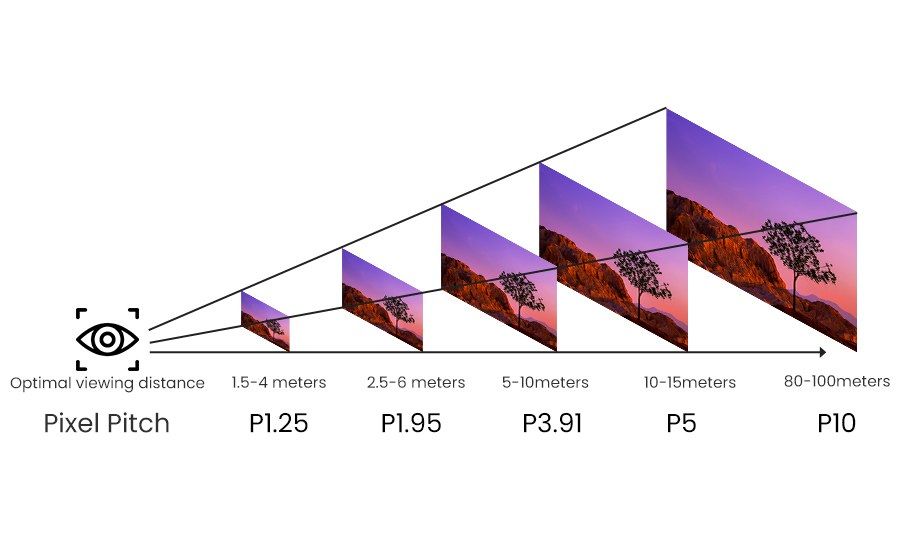
| Pixel Pitch | Min. Viewing Distance | Typical Use |
|---|---|---|
| P1.9 | 2 m (6 ft) | Boardrooms, premium indoor installs |
| P2.6 | 2.5–3 m (8–10 ft) | Trade shows, corporate events |
| P2.9 | 3 m (10 ft) | Conferences, presentations |
| P3.9 | 4 m (13 ft) | Concerts, ballrooms, outdoor stages |
| P4.8 | 5 m+ (16 ft) | Festivals, large outdoor displays |
What Pixel Pitch Does NOT Affect
- Overall screen brightness (measured in nits)
- Color accuracy or contrast ratio
- Panel reliability or lifespan
- Whether the screen is indoor or outdoor rated
P2.6 vs P3.9: The Most Common Rental Choice
For LED wall rentals in Toronto, P2.6 and P3.9 are the most commonly used pixel pitches. Both deliver professional-quality visuals — the right choice depends on viewing distance, venue size, and budget efficiency.
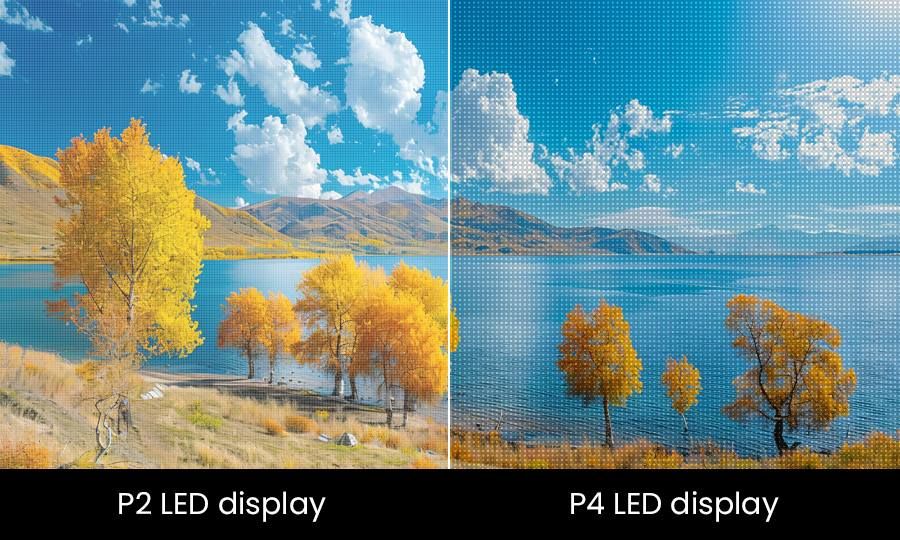
P2.6 LED Displays
- High resolution with approximately 147,000 pixels per square meter
- Ideal for indoor events with close audience proximity
- Excellent for text-heavy presentations and detailed graphics
- Common choice for trade shows and corporate conferences
- Higher rental cost due to increased pixel density
P3.9 LED Displays
- Approximately 65,000 pixels per square meter
- Designed for larger venues and outdoor use
- Best for video content and wide viewing angles
- More cost-effective for large screen sizes
- Faster installation and lighter panel weight
How to Choose the Right Pixel Pitch
To select the right LED display, consider these four factors:
1. Viewing Distance
If viewers will be within 3 meters (10 ft), choose P2.6 or smaller. For audiences farther away, P3.9 offers excellent image quality without unnecessary cost.
2. Content Type
Detailed content such as text, charts, and UI elements benefits from smaller pixel pitch. Video-heavy content is more forgiving and works well on larger pitch displays.
3. Venue Size
Smaller rooms require finer pitch displays. Large ballrooms, stages, and outdoor venues can effectively use larger pixel pitch screens.
4. Budget
Smaller pixel pitch means more LEDs per panel, which increases cost. The goal is to choose the largest pitch that still looks sharp at your viewing distance.
Common Event Applications
| Event Type | Recommended Pitch | Reason |
|---|---|---|
| Corporate presentations | P2.6 | Close seating, detailed content |
| Trade show booths | P1.5 – P2.6 | High foot traffic, short distances |
| Weddings & galas | P2.6 – P3.9 | Mid-range viewing, video content |
| Concerts & festivals | P3.9 – P4.8 | Large audiences, wide angles |
| Outdoor events | P3.9 – P4.8 | Distance viewing, weather exposure |
The Bottom Line
Choosing the right pixel pitch ensures your LED wall looks sharp, professional, and cost-effective. The best display is not the smallest pixel pitch — it’s the one matched correctly to your audience and venue.
At Pixelit Rent, we help clients across Toronto and the GTA select the ideal LED wall based on real-world viewing conditions, content type, and budget.